Building The India Portfolio #4 – Optimizing Your LLM Prompts: A Guide to our Prompt Optimizer Tool
Is this your idea of Prompt Engineering?

Do your LLM API runtimes look like this?
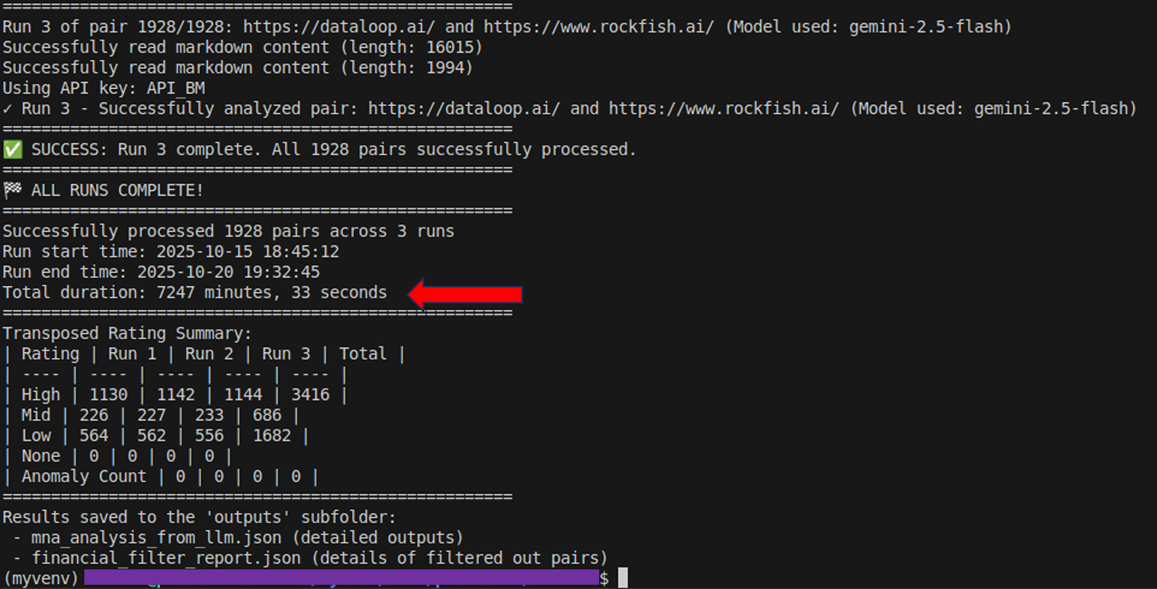
If yes, you really need the Prompt Optimizer
What is the Prompt Optimizer for?
The Prompt Optimizer helps you to identify quantitative/deterministic questions or tasks in your prompt that can be reliably answered using lines of code, instead of sending the whole prompt to the LLM API. It is designed to help reduce your inference times and API costs and also improve reliability of answers. This is Prompt Engineering done right.
The tool first analyzes your prompt and identifies which questions or tasks in your prompt are quantitative/deterministic in nature and which are qualitative. It then looks through the data samples provided by you to understand the contents and structure of the data and therefore determine which of the quantitative questions can be answered reliably from the data using code. Finally, it provides you with a structured output that indicates which questions can be processed without needing the LLM API and which need to be sent to the LLM API.
Key Concepts
Quantitative/Deterministic Questions: These are formulaic questions that can be computed or determined programmatically with code. Examples include:
- Direct data extraction from structured sources (e.g., "What is the company's name?")
- Simple calculations on extracted data (e.g., "What is the YoY revenue growth rate?")
- Aggregations (sum, average, count)
Qualitative Questions: These questions require complex reasoning, interpretation, or judgment from the LLM. Examples include explaining "why" something happened, strategic recommendations, predictions, or interpreting patterns.
Compound Questions Rule: If a single question asks for both a quantitative and a qualitative component (e.g., "what was the number, and why did it happen?") or needs multiple steps of reasoning, then such a question is a compound question. The Prompt Optimizer does not split compound questions into components yet, it treats the entire question as qualitative.
Product Walkthrough
Page Load: On page load, you will be presented with the overview of the tool and its key terms & conditions. Remember to read through this documentation. You have to agree to the terms before you can use the tool. Note, that the Prompt Optimizer is a client side tool that runs in your browser. Your API key and other inputs never reach our servers.
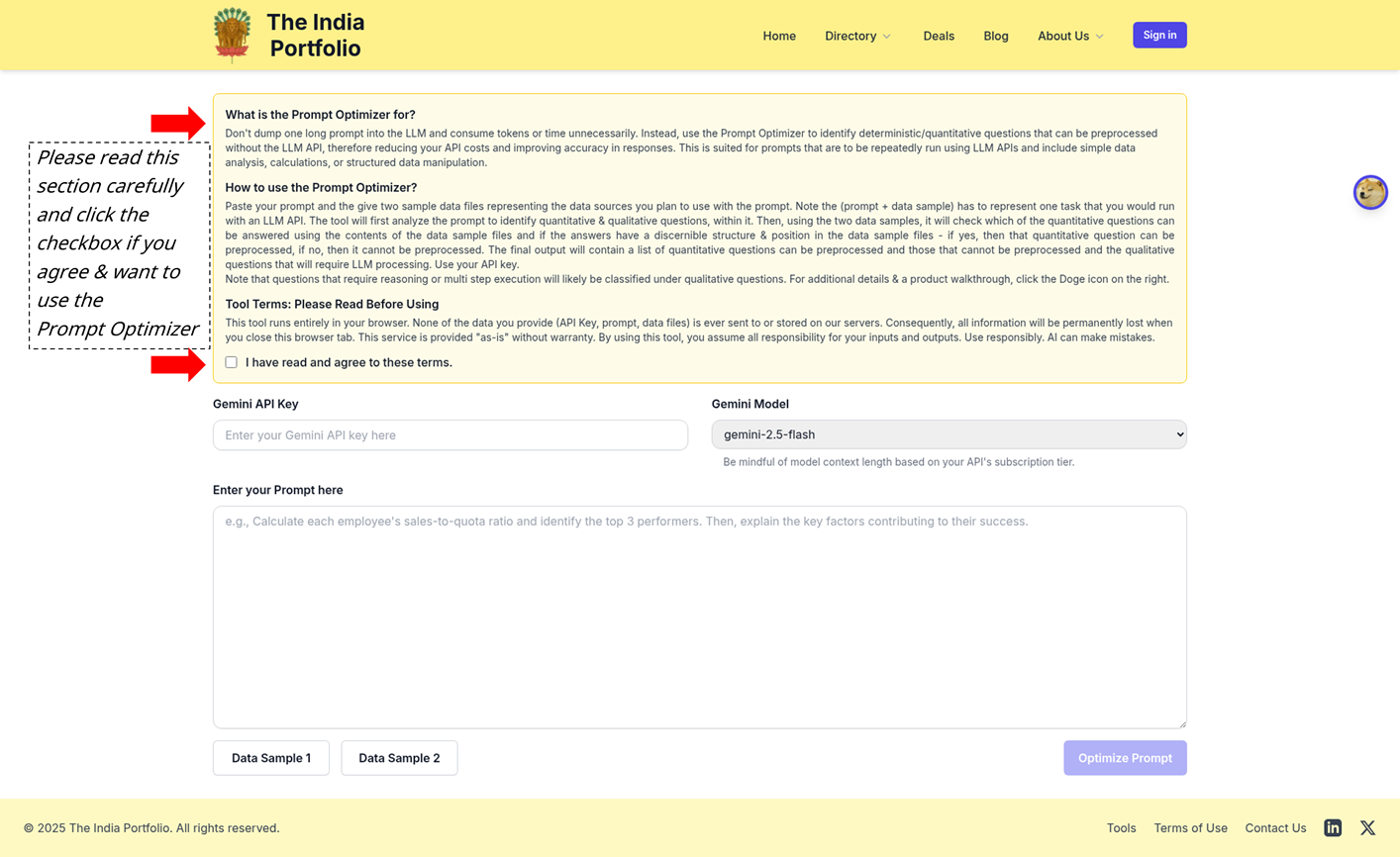
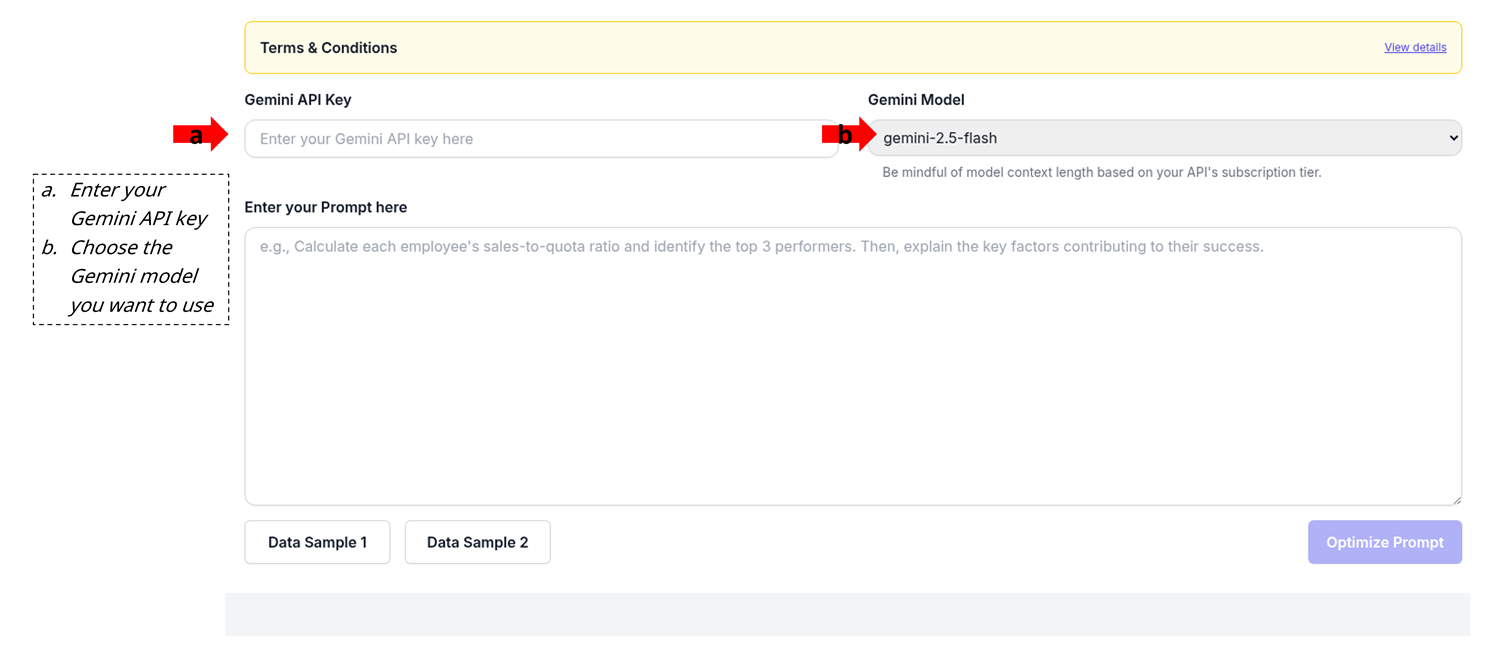
Provide your Gemini API key and choose a model: Provide a valid Gemini API key and select a model from the available options. The tool validates the API key in real-time. Be mindful of the context length limitations of different models based on your subscription tier.
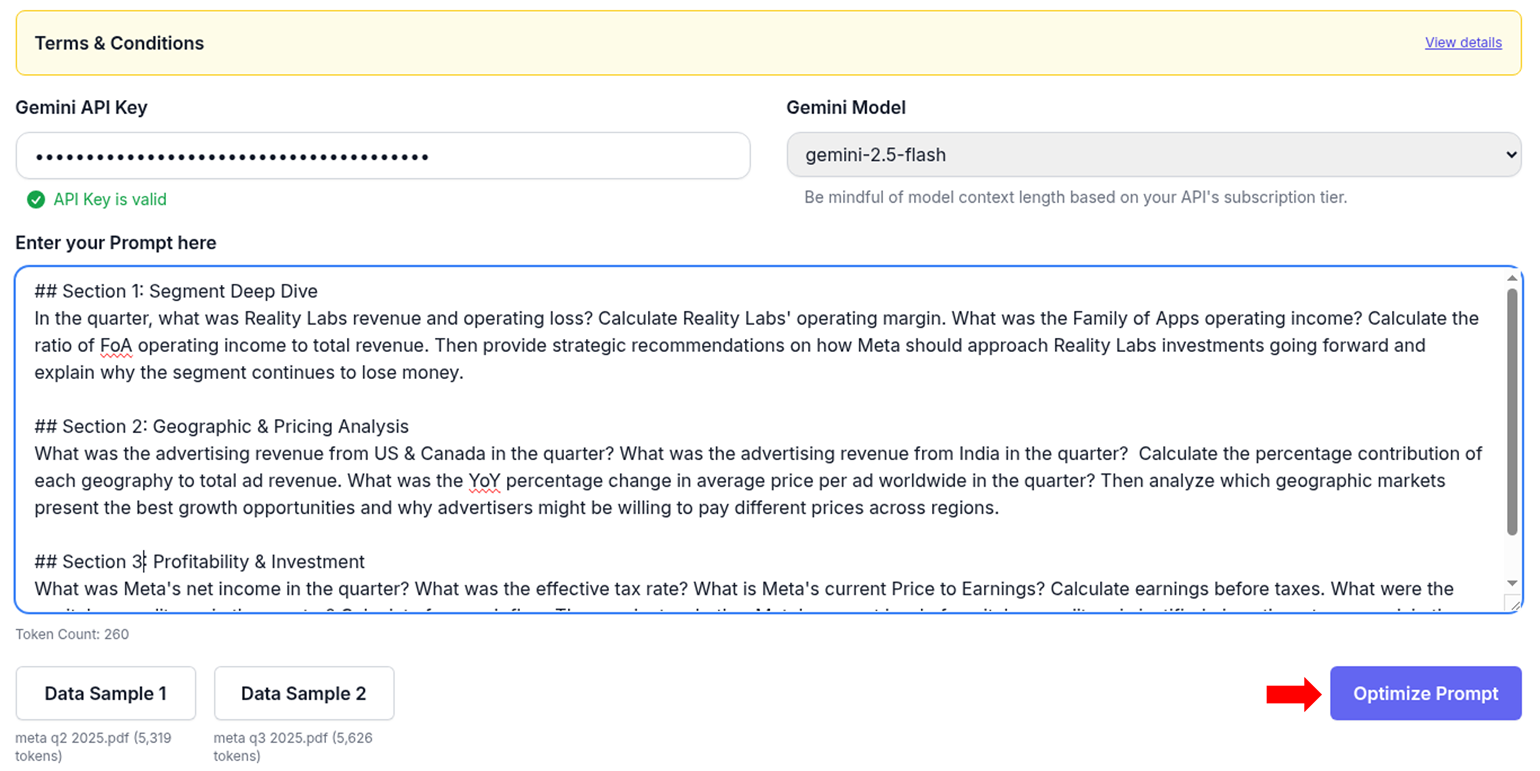
Enter your prompt & upload two data samples: Data samples can be text, csv, JSON, or PDF files, but note that images and non-text content within these files may not be processed correctly. Think of these data sample files as simulating data that you might pull from your databases or other structured data sources in the real world, including data APIs, for processing with LLM APIs.
Note, that the prompt plus any one data sample should represent one complete task that you would usually run with an LLM API. The two data samples are two similar but independent and self-contained sources of data, say like time series data for two different periods, or reports from two different regions. The questions in your prompt should be framed as if you are asking them about one data source only and your prompt language should be usable with either of the two data samples without needing any changes to the prompt wordings. So, in your prompt, avoid referring to "two data samples" or "both data files". Also, dont be too specific with your wording like instead of asking for "revenues in Q2", say "revenues in the current data sample or latest quarter".
The reason that two data samples are sought, is to check for consistency across your data in terms of structure and contents. If the data samples are too different in structure or dont consistently contain the required information to answer a quantitative question, then that question cannot be preprocessed reliably. Provide random samples from your data sources to stress test the optimization.
The token sizes of the prompt and the data sample files are provided to help you stay within model context limits. Also, note the that the Optimize Prompt button gets enabled only when all required inputs (API key, prompt and the 2 data samples) are provided. Here are the prompt and the Data Sample 1 and Data Sample 2 files used in this walkthrough.
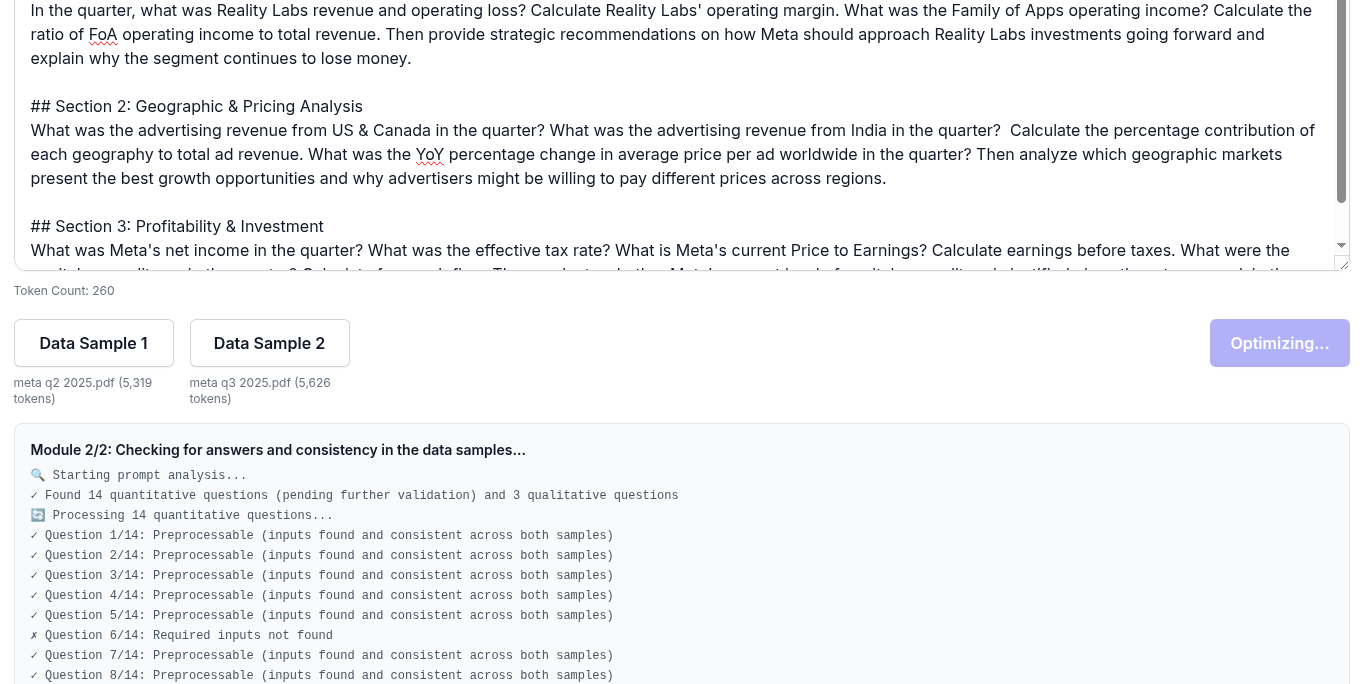
Processing state: You will see a progress update from the tool
Output: You will see the final output on screen and can also download the output as a JSON file. Here is the generated output json for the example shown in the walkthrough
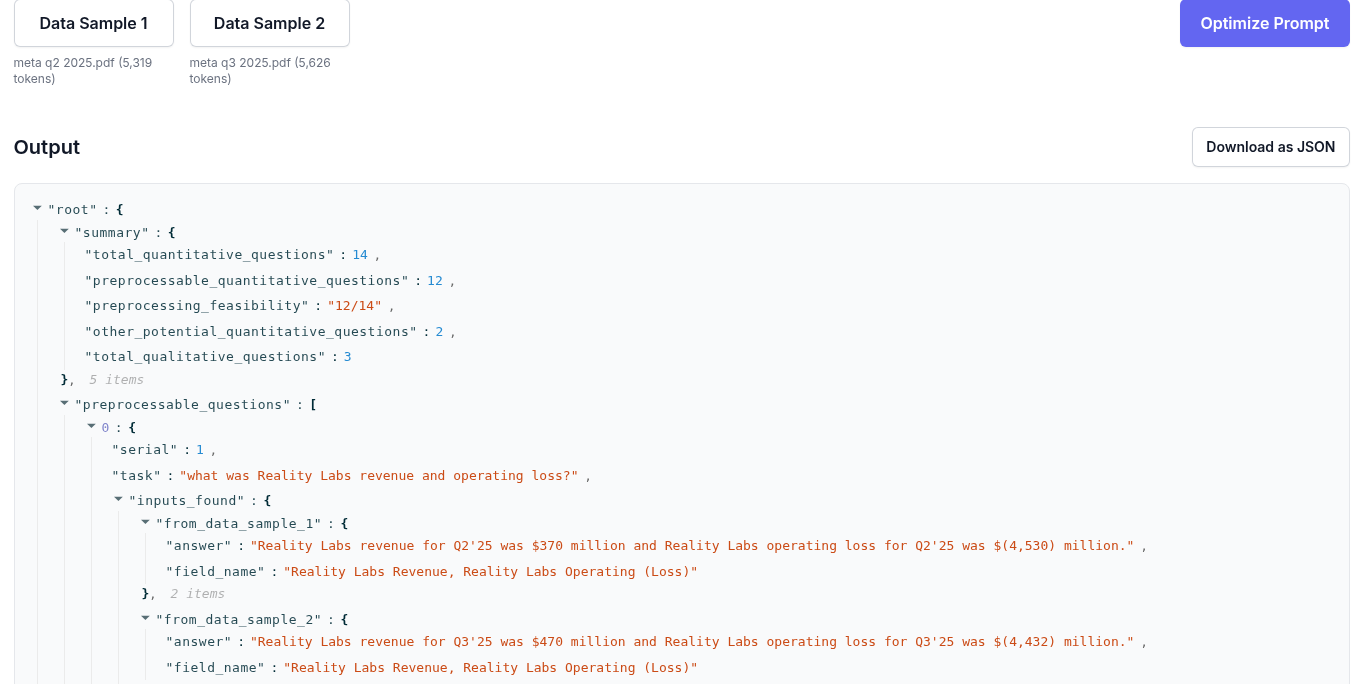
Refining your prompt: In this example, we detected 14 quantitative questions in the prompt, of which 12 could be preprocessed without needing the LLM API. The data samples that we used in this walkthrough were pdf files from a third party (Meta). PDF files are not particularly structured or easy to process (the intent was to demonstrate the capabilities of the tool). But if in your work, you have cleaner and more structured data sources (like databases, data APIs, CSV/JSON files with consistent structure), say something like this Data Sample 1 in json and this Data Sample 2 in json, the using the output from the Prompt Optimizer tool, you can identify those 12 quantitative questions that can be processed and then use code to answer those 12 quantitative questions directly from your data, and only send the remaining qualitative questions (2 in this case) to the LLM API. This can lead to significant savings in inference time and API costs and improved response accuracy. That is what the Prompt Optimizer tool is designed for.
Troubleshooting
Invalid API Key Error: Ensure your Gemini API key is correct and has the necessary permissions. Check your billing plan and quota on the Google AI Studio dashboard.
Rate Limit Exceeded (429 Error): You have exceeded your API quota. Wait for some time and try again, or consider upgrading your plan.
"Model returned an invalid JSON format" Error: This usually means the LLM's response could not be parsed into valid JSON. This can sometimes happen with complex prompts or unexpected model behavior. Try simplifying your prompt or re-running the analysis.
Inconsistent Results: If quantitative tasks are not being identified as preprocessable, review your data samples to ensure they contain the necessary information in a consistent and identifiable structure.
Any other issues or further assistance: If you encounter any other issues or need further assistance with the tool, please contact us
Who We Are
The India Portfolio isn't just another lab tinkering with AI. It is the deal making platform for the AI era. It uses AI-powered algorithms to analyze 400+ VC & PE funds and their 5,000+ portfolio companies in India, to surface opportunities suited to your strategy & stage. Stop hunting for deals, stop waiting for access - the right opportunities are right here, right now.
Do your own deals!